
HWID panel for League PCs
Disk serials, MAC addresses, GPU IDs, and TPM rows get a new pass when Riot Vanguard flags this PC. A cleaner runs before the next sign-in.
At a glance
A panel for flagged League PCs
After a hardware flag, the panel can rewrite disk serials, MAC addresses, GPU IDs, and TPM-related rows Riot Vanguard may store. The aim is a clean sign-in on this machine.
2 further rows are in the feature table lower on the page.
Overview
A refresh when the block is this PC
Which identifiers the panel rewrites, how Riot Vanguard fingerprints this PC, and how a machine flag differs from an account sanction on League of Legends.
Start here after a Riot Vanguard hardware flag on this League PC. Refresh disk serials on this machine. The same pass covers MAC addresses, GPU IDs, and related fingerprints. A cleaner is in the package. This is a spoof tool for the machine, not a pardon for the account.
Other computers can queue with a new login while this one fails at client launch or install. A sanction stored on the Riot account stays. Spoofing only addresses machine-level refusal tied to hardware.
Flags that stay with the machine
A hardware flag follows the PC. Changing the username does not move it. Refresh the identifiers, and if other rigs accept a sign-in and this one rejects every new account. Disk serials are rewritten in the panel. MAC addresses, GPU IDs, and related fingerprints are in that same pass. Sign-in can then use a clean hardware profile. A sanction that remains on the account is not lifted.
Riot Vanguard and hardware flags
League of Legends loads Riot Vanguard at queue time. Spoofing hardware identifiers can conflict with Riot’s terms and can bring new penalties. It does not lift a sanction that is still on the account. A hardware check can change without a new note on this page, and after a Vanguard or client update. Read this page and confirm the title before checkout.
Cleanup that ships with the license
A cleaner is included and it removes leftover traces after the spoof. Finish the identifier changes, run that cleanup, and start the game in the order the current portal guide gives.
Requirements on this PC
Windows 10 or 11, 64-bit, is the OS here. The spoof and the cleaner need administrator rights. In Windows Security, HVCI and Core Isolation stay on. Internet stays up for activation and updates. In firmware, TPM and Secure Boot stay on.
Listed rows
Fingerprint rows on this page
Each row names a fingerprint the panel edits, or an anti-cheat family described here.
- Disk serial rewrite
- MAC address rewrite
- GPU identifier rewrite
- Related hardware fingerprints
- Trace cleaner in the license
- Hardware flag on this PC
- Does not clear an account sanction
After checkout
Panel notes, then the portal order
Panel callouts stay on the left. License delivery and the setup order stay on the right.
Panel shots
- Layer A
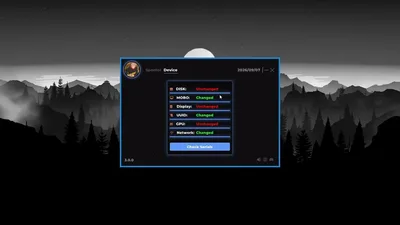
Serial check rows
After a spoof cycle, each row says whether that hardware value changed.
- Layer B
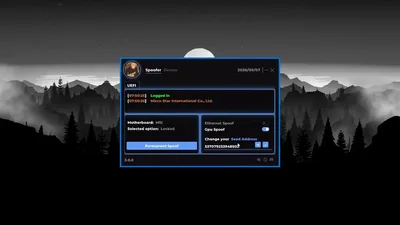
Firmware controls
From this firmware screen you can switch GPU or ethernet spoofing, type a seed, and apply a permanent change.
More products
Pairs well with
The other licenses sold here. Open one to see its page and its checkout.
- League of Legends Cheats A Windows menu with orbwalker, evade, prediction, champion logic, activators, and map overlays. Cloud DMA has to be connected before the full set runs. View details: League of Legends Cheats
- Cloud DMA Cloud DMA can also require GREENWARD, Static Server, and AWS, each bought on its own. Read that list on the Cloud DMA page before you order. View details: Cloud DMA
- Skin Changer A small client previews champion skins, chromas, and ward skins on your screen. The look stays on this PC and is not written into your Riot inventory. View details: Skin Changer
FAQ
Questions about this page
Answers for this page. The FAQ page holds the rest.
Blog
Related guides
Filter by topic for setup notes, module explainers, and patch-day checks.
A hardware flag is a device restriction. It is not a dropped connection or a bad password.
Temporary and permanent are labels. Compare what survives a reboot, not the adjective on the sales page.
VAN 152 is the hardware-ban code. It is not a generic Vanguard startup failure.
An account sanction and a hardware flag block different things, even when both feel like a ban.
A hardware restriction do not share one fix, a short suspension, a permanent account ban.
LoL read-only threads
Read discussion
Read-only answers on League of Legends cheats, orbwalker, evade, Cloud DMA, HWID panels, and Vanguard. Each answer points at a longer note.
- Account & HWID When is the HWID panel the right League tool? Use the HWID spoofer when every new account fails on this PC but works elsewhere. It rewrites hardware fingerprints; it does not remove an account sanction.
- Account & HWID Hardware flag or account sanction: which block is it? An account sanction blocks the login everywhere. A hardware flag lets login on other PCs but rejects new accounts on the flagged machine.